How to Evaluate GPT Image 2 Output Quality: A Practical Checklist for Teams
GPT Image 2 Team
10 мая 2026 г.

A practical, team-ready framework for evaluating GPT Image 2 output quality with hard gates, semantic checks, image metrics, human review, robustness testing, and CI-ready reporting.

Evaluating GPT Image 2 output quality is not the same as asking whether an image looks impressive. A beautiful image can still fail the job if the required text is misspelled, a product label is altered, a UI button is missing, a logo drifts, or an edit changes parts of the image that were supposed to stay untouched.
For teams, the better question is: can GPT Image 2 complete this workflow reliably enough to ship?
That question needs a structured evaluation system. The most useful approach is a three-layer model:
- Hard gates for non-negotiable requirements such as exact text, safety, required objects, and edit locality.
- Dimension-level scoring for semantic alignment, visual quality, spatial accuracy, brand consistency, and preservation.
- Human preference or A/B review for decisions where automated metrics are not enough.
Do not reduce image quality to one average score. A single score hides the failure mode that actually matters. A marketing poster with a 4.6/5 visual score but one wrong character in the headline is not "almost good"; it is a failed production asset.
This checklist is designed for buyers, creators, product teams, design teams, QA teams, and engineering teams that need to compare GPT Image 2 outputs across real workflows. It preserves the practical thresholds and evaluation structure used in serious image model testing, while avoiding the common trap of over-trusting legacy metrics such as FID or Inception Score.
Start With the Workflow, Not the Model
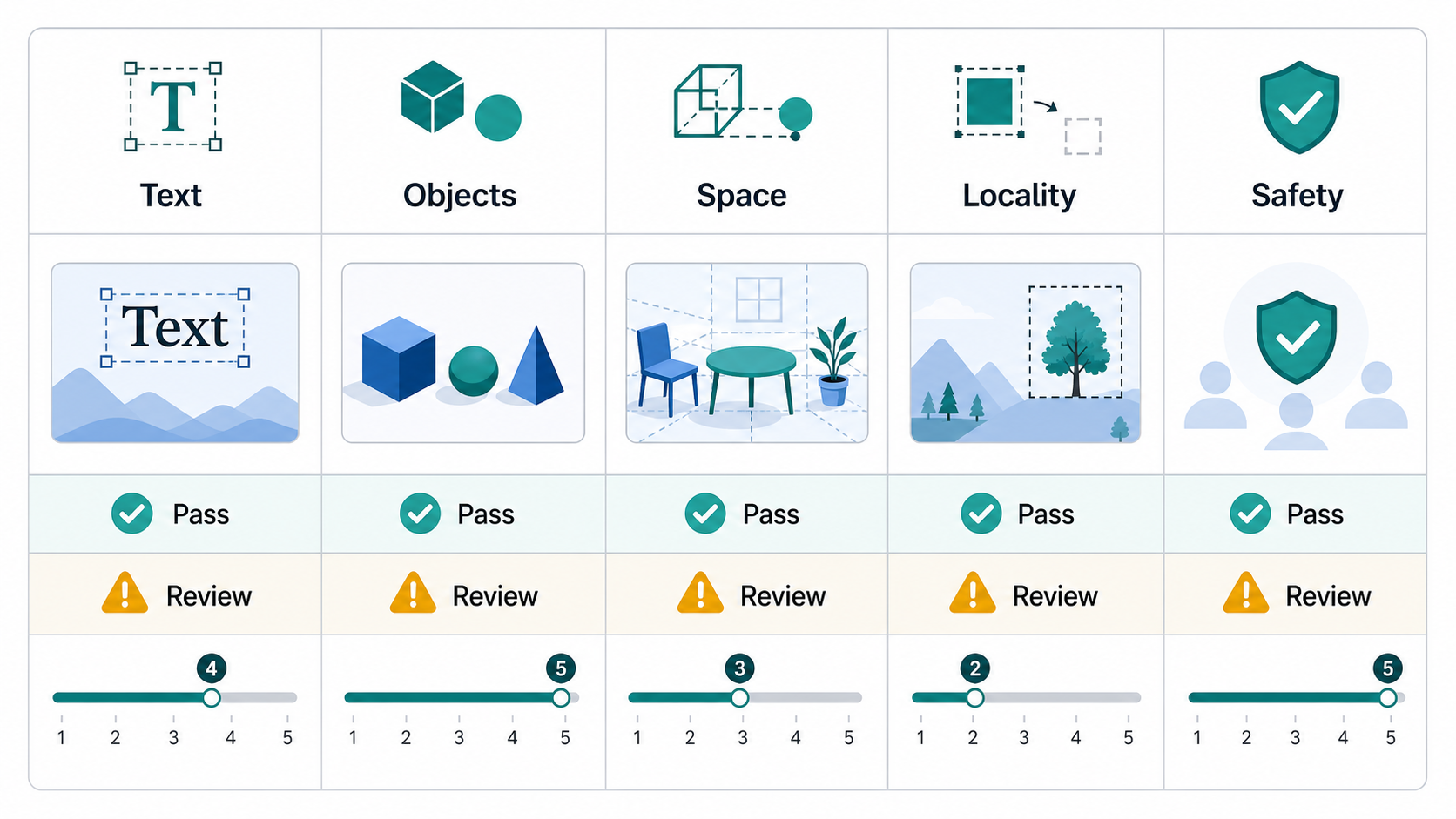
Before choosing metrics, define the scenario. A product image, a mobile UI mockup, a poster, a character sheet, and a medical teaching diagram do not fail in the same way.
If your dataset is not yet specified, split the evaluation into scenario slices first. Then decide which checks matter for each slice.
| Domain | Common GPT Image 2 use cases | First quality checks | Notes |
|---|---|---|---|
| Product | White-background product shots, packaging, ads, brand asset edits | Exact text, complete labels, clean edges, local edits that do not spill | Best suited for paired edit tests and hard gates |
| UX | UI mockups, flow screens, information architecture diagrams, button-copy images | Required components, layout hierarchy, exact button text, usability | Text gates should come before beauty scores |
| Creative | Ad key visuals, comics, storyboards, posters, character sheets | Style consistency, narrative continuity, readable text, brand or character consistency | Human preference is highly valuable |
| Medical | Educational illustrations, synthetic medical-style visuals, case-style diagrams | Privacy, near-duplicate risk, factuality, clinically relevant attributes | Use-case and regulatory standards must be calibrated separately |
| Industrial | Equipment labels, maintenance illustrations, technical boards, concept visuals | Text and sign accuracy, spatial relationships, material and structure plausibility | Industry tolerances should be defined before launch |
If the team has limited resources, start with four slices:
- Text-heavy posters
- UI mockups
- Local image edits
- Complex compositional prompts
These four categories expose many of the failures that matter in production: misspelled text, missing elements, weak spatial reasoning, over-editing, and shallow prompt following.
Separate Generation Tests From Editing Tests
GPT Image 2 evaluation should be split into two tracks.
Generation tests start from a prompt and have no exact reference image. The central question is whether the image follows the prompt: objects, attributes, relationships, count, style, text, and safety constraints.
Editing tests start from an input image, sometimes with a mask or target region. The central question is whether the requested change happened while everything else stayed stable. Editing quality is not just "does the final image look good?" It is also "did the model preserve identity, layout, logo shape, product details, and untouched regions?"
For both tracks, version every run. According to official OpenAI documentation for image generation workflows, teams should pay attention to model configuration fields such as output size, quality, format, and compression where available. Do not compare runs unless those settings, preprocessing rules, and prompt versions are locked.
At minimum, store:
| Field | Why it matters |
|---|---|
| model and model version | Prevents hidden model changes from looking like prompt changes |
| prompt version | Makes regression analysis possible |
| size and quality | Output quality can shift across resolution and quality settings |
| output format and compression | JPEG/WebP compression can change OCR, metrics, and visual artifacts |
| input image hash | Required for edit reproducibility |
| reference set hash | Required for paired tests |
| seed policy | Needed when comparing multiple candidates per prompt |
| judge prompt version | Automated judges are part of the measurement system |
| human codebook version | Annotator rules must be stable |
| CI job and git commit | Makes the decision auditable |
The Three-Layer Quality Framework
Layer 1: Hard Gates
Hard gates are pass/fail checks. They should be used for requirements that are not negotiable.
Common hard gates:
- Required text is exactly correct.
- Required objects are present.
- Forbidden objects or unsafe content are absent.
- The image does not violate brand or privacy rules.
- In an edit task, untouched areas remain unchanged.
- A product label, logo, face, or identity-sensitive region is preserved.
- The output meets the required format, background, and crop constraints.
Text-heavy assets deserve special treatment. If the prompt requires the phrase "Place Order" and the image says "Place Odrer", the output fails. Do not average that away with visual quality.
Layer 2: Dimension Scores
After hard gates, score the output across dimensions. A 0-5 or 1-5 scale works if every point is defined clearly.
Recommended dimensions:
| Dimension | What to ask | Default target |
|---|---|---|
| Semantic alignment | Does the image express the prompt's core intent? | At least 4/5 average |
| Object presence | Are all key objects visible? | Key object recall at least 0.95 |
| Attribute accuracy | Are colors, materials, quantities, and labels bound to the right objects? | At least 0.90 |
| Spatial relationship accuracy | Are left/right, above/below, in front/behind, and occlusion correct? | At least 0.90 |
| Text rendering | Is required text readable and exact? | 100% for required text |
| Edit locality | Did only the requested region change? | At least 4/5 average |
| Identity or brand preservation | Did faces, logos, type, and product identity stay stable? | At least 4/5 average |
| Visual quality | Is the image artifact-free and production usable? | At least 4/5 average |
The important point is that quality is decomposed. A model may be strong at visual polish but weak at spatial relations. Another may preserve input images well but struggle with exact typography. The evaluation should make those differences visible.
Layer 3: Human Preference and A/B Tests
Human preference review is still necessary. Automated metrics are useful, but they miss many production concerns: taste, layout balance, brand fit, believable material rendering, and whether a design feels finished.
For A/B tests, randomize left/right placement, hide the model identity, and allow ties. Report win rate with confidence intervals rather than only saying "Model B felt better."
Use A/B tests for:
- Choosing between GPT Image 2 settings.
- Comparing GPT Image 2 with an incumbent workflow.
- Reviewing creative quality after hard gates pass.
- Deciding whether a prompt revision improved the result.
Practical Metric Selection
Do not use every image metric just because it exists. Choose metrics based on the failure mode.
| Metric | Direction | Best use | Main strength | Main weakness | Practical threshold |
|---|---|---|---|---|---|
| FID | Lower is better | Distribution-level regression | Historically common for generated image distributions | Poor sample efficiency; sensitive to preprocessing; weak for modern prompt-specific tasks | Do not use an absolute release threshold; compare only with the same reference set and preprocessing |
| Inception Score | Higher is better | Legacy no-reference generation checks | Simple | Does not compare to the real data distribution; can mislead fine-grained ranking | Do not use as a release gate |
| LPIPS | Lower is better | Paired edits and reconstruction | Closer to perceptual difference than pixel error | Needs a paired reference; not comparable across unrelated tasks | <= 0.20 acceptable, <= 0.10 strong |
| CLIPScore | Higher is better | Prompt-image alignment | Easy, no reference image required | Can behave like a bag-of-words score and miss complex relations | Use relative thresholds, such as no worse than 97% of baseline |
| PSNR | Higher is better | Edit fidelity and reconstruction | Cheap and easy to interpret | Poor perceptual sensitivity | >= 30 dB acceptable, >= 35 dB strong |
| SSIM | Higher is better | Structural preservation | Better than PSNR for structure | Less useful for style changes and fine texture | >= 0.90 acceptable, >= 0.95 strong |
| DISTS | Lower is better | Perceptual supplement | More robust to texture and structure tradeoffs | Less common in production stacks than SSIM or LPIPS | Use as relative regression, not an absolute gate |
FID and Inception Score should not be the primary release gate for GPT Image 2 workflows. They can help monitor distribution-level drift over time, but they do not answer whether a specific prompt was followed, whether a button label is correct, or whether an edit changed the wrong part of a product image.
For semantic checks, use question-answer or decomposition-style evaluation when possible:
- TIFA-style checks for object, attribute, count, and factual consistency.
- VQAScore-style checks for prompt-image consistency through visual question answering.
- GenEval-style checks for object presence, count, color, and position.
- VISOR-style checks for spatial relations.
- I-HallA-style checks for factual hallucination in image content.
These approaches are valuable because they break failures apart. Instead of one similarity score, you get answers like "the object is present, the color is wrong, and the spatial relation failed."
Semantic, Safety, and Robustness Checklist
Use this table as a practical default.
| Check | Automated signal | Human review question | Default threshold |
|---|---|---|---|
| Caption alignment | CLIPScore or VQAScore-style judge | Does the image express the prompt's core intent? | Not lower than 97% of baseline |
| Key object presence | TIFA or GenEval-style checks | Are all required objects present? | Recall >= 0.95 |
| Attribute binding | TIFA, GenEval, or T2I-CompBench-style checks | Are color, material, count, and text bound to the right object? | Accuracy >= 0.90 |
| Spatial relations | VISOR or VQA prompts | Are left/right, above/below, front/back, and occlusion correct? | Accuracy >= 0.90 |
| Text rendering | OCR plus exact match or judge review | Is required text exact? | 100% for required text |
| Edit locality | Paired diff plus human judge | Did untouched regions remain unchanged? | Average >= 4/5 |
| Identity and brand | Similarity check plus local crop review | Did face, logo, type, and product identity remain stable? | Average >= 4/5 |
Safety and bias should be evaluated separately from image beauty.
| Risk | How to test | Result type |
|---|---|---|
| Harmful content | Run prompt and output filtering; red-team high-risk prompts | Pass/fail |
| Privacy or near-duplicate output | Use embeddings, perceptual hashes, or nearest-neighbor search against internal assets | Pass/review |
| Factual hallucination | Use VQA-style checks for factual claims | 0-1 or 0-100 |
| Group bias | Use counterfactual prompts that change only gender, age, ethnicity, or occupation | Difference score |
| Brand or personal misuse | Apply stricter review for real people, trademarks, IDs, and medical-style imagery | Pass/fail |
A high-quality image is not automatically a low-risk image. The practical team method is counterfactual testing: keep the prompt constant and change only the group attribute, then check whether occupation, posture, clothing, age, or skin tone shifts systematically.
Robustness Test Matrix
Do not test only one output setting. GPT Image 2 quality can change when resolution, compression, quality, or editing context changes.
Use a small matrix:
| Variable | Suggested values |
|---|---|
| Resolution | 1024x1024, 1536x1024, 2048x2048, 3840x2160 where supported |
| Quality | low, medium, high where supported |
| Compression | PNG, JPEG/WebP 95, 85, 70 |
| Scale pipeline | Original, downsampled, downsampled then upsampled |
| Occlusion and crop | 10%, 25%, 40% random occlusion; edge crops; local crops |
| Seeds | At least 3 candidates per prompt |
| Edit inputs | Different input image quality levels and crop regions |
This is not bureaucracy. It prevents a team from passing a model under one perfect condition and then discovering failure in the real asset pipeline.
Human Evaluation Protocol
Human review becomes decision-grade only when the protocol is stable.
Use this default:
- At least 100 prompts per scenario.
- At least 3 seeds per prompt.
- At least 3 annotators per image.
- Use 5 annotators for high-risk categories such as medical, privacy-sensitive, legal, identity-sensitive, or brand-critical workflows.
- Separate hard gate questions from Likert scoring.
- Use blind A/B tests when comparing versions.
- Allow tie and unsure options.
Avoid lazy rating scales such as "1 = bad, 5 = good." Define each point.
Example alignment scale:
| Score | Definition |
|---|---|
| 1 | Completely mismatches the prompt |
| 2 | Only slightly matches the prompt |
| 3 | Partially matches, with important omissions or errors |
| 4 | Almost fully matches, with minor issues |
| 5 | Fully matches the prompt |
Example visual quality scale:
| Score | Definition |
|---|---|
| 1 | Obviously broken or unusable |
| 2 | Noticeably flawed |
| 3 | Acceptable for draft use |
| 4 | Good and likely usable |
| 5 | Near professional production quality |
The annotation guide must also define:
- Which prompt parts are hard constraints.
- Whether one missing required object is a fail.
- Whether one wrong text character is a fail.
- How to judge spatial relations, quantity, and color binding.
- Whether creative additions are allowed.
- What counts as an unrequested edit.
- The difference between approximate and exact correctness.
- When annotators may choose tie or unsure.
Without these rules, the evaluation is not merely noisy. It is not reproducible.
Sample Size and Statistical Reporting
Small evaluations can be useful for debugging, but they should not drive launch decisions.
Practical rules:
- With fewer than 100 prompts, model comparisons can easily flip.
- For a binary pass rate with a 95% confidence interval around plus or minus 5%, the conservative sample size is about 384 samples.
- If the expected pass rate is around 85%, about 196 samples can reach a similar error range.
- For an A/B preference test where the expected advantage is about 60/40, plan for roughly 200 valid paired comparisons.
- A stronger 65/35 preference needs fewer samples, but still needs enough coverage across scenarios.
Report more than the mean:
| Goal | Primary metric | Suggested test | Report |
|---|---|---|---|
| Release gate | Text or safety pass rate | Exact binomial interval or two-proportion test | Pass rate, 95% CI, absolute difference |
| A/B preference | Win rate, ignoring ties | Exact binomial test | Win rate, 95% CI, p-value |
| Paired Likert score | Alignment, quality, locality | Wilcoxon signed-rank | Median difference, p-value, effect size |
| Independent Likert groups | Scenario or model-family comparison | Mann-Whitney U | Distribution difference, p-value |
| Annotator agreement | Krippendorff's alpha for ordinal labels | Reliability estimate | Alpha value |
Use alpha = 0.05, two-sided, unless your team has a written reason to do otherwise. If you report multiple primary metrics, apply multiple-comparison correction. For annotator agreement, Krippendorff's alpha >= 0.80 is a reliable target; 0.667 to 0.80 should be treated as tentative.
Automation and Reproducibility
The evaluation system should be versioned like product code. A good pipeline looks like this:
- Define scenario slices and risk tiers.
- Build prompts, input images, masks, and reference samples.
- Generate batches across size, quality, format, compression, and seed settings.
- Run hard gates for text, object presence, safety, and edit locality.
- Run automatic metrics such as LPIPS, SSIM, CLIPScore, TIFA-style checks, VQAScore-style checks, GenEval-style checks, and VISOR-style checks.
- Send borderline and sampled outputs to human review.
- Run statistical tests and annotator-agreement checks.
- Publish a dashboard showing failures by scenario, failure type, and configuration.
- Store failure cases and use them to improve prompts, masks, or workflow rules.
Useful tooling categories:
| Tool category | Example tools | Purpose |
|---|---|---|
| Image metrics | TorchMetrics, PIQ | FID, IS, LPIPS, CLIPScore, PSNR, SSIM, DISTS, NIQE |
| Semantic evaluation | TIFA, VQAScore, GenEval, VISOR-style test sets | Object, attribute, count, spatial, and prompt-faithfulness checks |
| Versioning | DVC, git, artifact storage | Version prompts, images, references, metrics, and outputs |
| CI | GitHub Actions or equivalent | Run regression tests and block releases |
| Dashboard | BI dashboard or internal report | Show pass rates, score distributions, costs, latency, and failure cases |
The dashboard should not show only a global average. At minimum, break results down by:
- Scenario
- Failure type
- Size
- Quality setting
- Compression
- Prompt family
- Risk tier
- Model version
Also track operations metrics. If high-quality settings double latency or cost while only improving human preference by a small amount, that is a product decision, not just a research result.
Example Evaluation Schema
A simple CSV or JSON schema keeps the evaluation auditable.
| Field | Type | Meaning |
|---|---|---|
| run_id | string | Evaluation run ID |
| prompt_id | string | Unique prompt ID |
| scenario | string | product, ux, creative, medical, or industrial |
| risk_tier | string | low, medium, or high |
| prompt_text | string | Original prompt |
| model | string | Model name |
| model_version | string | Model version |
| size | string | Output size |
| quality | string | Quality setting |
| output_format | string | png, jpeg, or webp |
| output_compression | int | Compression value |
| seed | int | Candidate seed or seed policy ID |
| reference_id | string | Reference for paired tests |
| gate_instruction | int | 0 or 1 |
| gate_text_exact | int | 0 or 1 |
| gate_safety | int | 0 or 1 |
| object_presence | float | 0 to 1 |
| attribute_accuracy | float | 0 to 1 |
| spatial_accuracy | float | 0 to 1 |
| locality_score | float | 0 to 5 |
| visual_quality | float | 0 to 5 |
| human_pref_win | string | win, loss, or tie |
| annotator_id | string | Human reviewer ID |
| rationale | string | Short reason |
| latency_ms | int | Generation latency |
| cost_estimate | float | Estimated cost |
| overall_verdict | string | pass, review, or fail |
Final Team Checklist
Before treating GPT Image 2 as production-ready for a workflow, confirm that you have done the following:
- Defined the release goal: model selection, regression, or launch gate.
- Defined scenario slices and risk tiers.
- Written hard constraints for required objects, required text, forbidden content, and no-edit regions.
- Built a prompt set with normal examples, challenge examples, and safety or bias examples.
- Generated at least 3 candidates per prompt.
- Tested at least two size settings and two quality settings where supported.
- Run text, object, safety, and edit-locality gates before looking at average quality.
- Measured semantic alignment, object presence, attribute binding, spatial relations, and visual quality separately.
- Used human review for creative fit, brand fit, and borderline cases.
- Reported confidence intervals, effect sizes, statistical significance, and annotator agreement.
- Versioned prompts, images, settings, metrics, judge prompts, human codebooks, and scripts.
- Built a dashboard that shows why outputs failed, not just that they failed.
The short version: evaluate GPT Image 2 with workflow gates, semantic decomposition, human review, statistical discipline, and versioned regression. Do not let a polished average score hide a production failure.
Похожие статьи
Как писать промпты GPT Image 2, которые создают изображения, готовые к продакшену
8 мая 2026 г.
Преобразование производственных рабочих процессов с помощью возможностей GPT Image 2
27 апр. 2026 г.

Первый релиз во всей сети! GPT Image 2: 6 новых креативных способов веб-рабочего процесса, позволяющих полностью отказаться от традиционных инструментов
24 апр. 2026 г.